
Intelligent execution,
work at any time & anywhere.
Stat Organized
Communicate and collaborate in one place
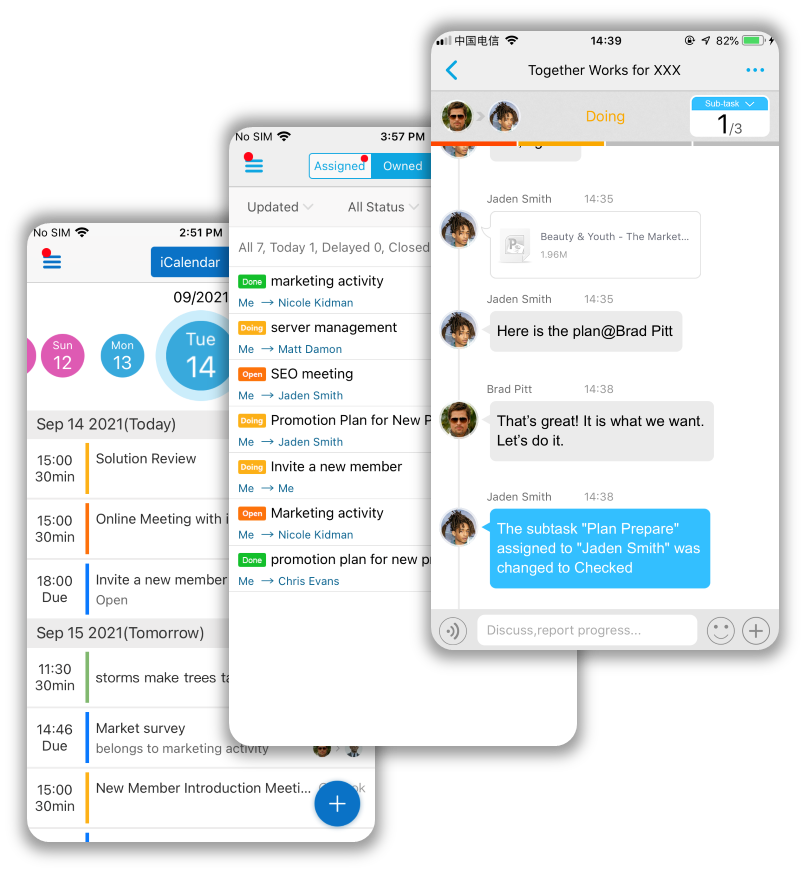
Communicate and collaborate in dedicated online meeting rooms, making task progress and communication easy to locate and track.
Full task status life-cycle
Complete task status lifecycle, from to-do, to start, to delivery, and finally to completion and filing.
Powerful Task List
The task list can be viewed and sorted by person, role, tag, and top.
Smart Work Calendar
In addition to meeting items from your phone and Outlook, the smart calendar also displays tasks, sub-tasks, and to-do items due that day, as well as possible time conflicts and unfinished tasks, in a timeline manner.
.jpg)

01
What does NexTask advocate?
NexTask advocates organizing virtual teams by task and empowering them to communicate, collaborate, evaluate, motivate, validate, and more in real-time.
02
What does NexTask believe?
NexTask believes that task virtual teams are inherently borderless, flat, cross-departmental, cross-hierarchical, and cross-company, and that this is the future of organizations.
03
What does NexTask combine?
NexTask combines the advantages of three major collaboration tools: the ability to organize information from email, efficient communication from instant messaging and video conferencing, and progress updates from project management.
04
What does NexTask respect?
NexTask respects the differences in how people work, whether they work remotely from home, in the office, or on the move.
NexTask is a revolutionary digital work tool
that builds collaboration around team tasks
to See How NexTask
Keep Your Company on the Right Way

Task-based virtual teams
By forming a task team that sets goals, deadlines, leaders, and team members, everyone on the task team is connected by instant messaging and various means of collaboration. Task progress information is automatically pushed to team members.
Available Across All Platforms
NexTask can be accessed from both PC and mobile devices, making it possible for people to communicate and collaborate fastest no matter where they are located, so that information is always synchronized, and important tasks are always on track.
Enterprise mobile contact list
From the employee page, you can not only see the contact information, job title, superiors and subordinates, but also quickly chat with them or assign them tasks.
Stat Connected
.jpg)
Stat Focused
Focus on Unread Message
You can focus properly by glancing at the list of tasks you care about for unread messages. You don't have to go through a bunch of irrelevant information to find out there's nothing you want.
Focus on Important Tasks
The list of important tasks worthy of your focus must be short. The various categories, sorting, and filtering of your task list allow you to focus on a shorter list right now.
Focus on Sent Files
It's easy to browse files that have been sent in the specific task. Rich filters help you find files that have been sent in NexTask.
.jpg)
Collaborate in the task room
The Task Room is designed to synchronize progress, submit questions, get feedback, and make suggestions in real-time, so it comes with a wealth of collaboration tools, including instant messaging, document transfers, cameras and annotations.
Multiple Message Type
Task Room can send text, emojis, voice messages and locations, as well as tag, annotate, rotate and crop images before sending them, browse and send files in phone folders, NexTask personal file cabinets.
Optional Sub-tasks
The sub-tasks are optional and are used to set specific assignments and deadlines for each person, as well as to mark what has been accomplished.
Shareable task lists and calendars
Share your to-do list and calendar with your colleagues or leaders to let them know what you're up to and when you're free.
Stat Collaborated
.jpg)
Stat Motived
Praise Excellence
After the completion of the task, the assignor will check and evaluate the task, and may give MEDALS to the virtual team members with excellent performance.
Personal Achievement Wall
All MEDALS received by an employee are displayed on the user profile page and visible to all colleagues from the company directory.
.jpg)